
Notion Review: The Architecture of a Modern Workspace

Notion has long since evolved beyond just a simple planner. Today, this platform is used by approximately 100 million people worldwide, from freelancers to large international companies. Its success is due to its well-developed ecosystem, which is now setting new standards for teamwork. In our Notion review for 2026, we'll take a closer look at Notion's key features and explore how it has become a model for modern workspace architecture.
Database Infrastructure and Relational Logic
A workspace shouldn't just store information; it should also help organize it, find the information you need, and establish connections between different elements. Notion solves these problems with a unified content organization system that integrates documents, tasks, knowledge bases, and structured data.
Notion databases form the foundation for working with data. They allow you to organize information, link records together, and adapt them to different workflows. Let's look at how this system is structured and the architectural decisions that underlie it.
Source: notion.com
Block architecture
Notion uses a unified block architecture. Nearly all content elements (text, images, headings, lists, pages, and database rows) are represented as blocks. Pages are composed of nested blocks. Each block has its own ID and type, and its content and structure depend on its category.
Each database record is a separate page with properties and content. In addition to the basic properties, such a page can contain additional properties of various types: text fields, statuses, links, dates, formulas, and other parameters.
Notion's data structure combines a hierarchical organization of blocks with the ability to establish relationships between individual pages and database records. Relationships are established through special relation properties. Nesting allows for the construction of tree-like structures, while relation properties allow for the linking of related projects, tasks, contacts, and other objects.
Database infrastructure
Notion databases allow you to organize structured data and establish relationships between records through relation properties. The platform's server infrastructure is based on PostgreSQL, a database management system for such DBs. It uses a unified structure to store different types of content.
Each block is stored in a separate row containing its data and metadata. This allows you to place text, images, headings, and other content elements on a single Notion page.
Data is hosted on the AWS cloud infrastructure using Amazon RDS for PostgreSQL. The platform's API processes data requests and facilitates client-server interactions. Real-time synchronization of user changes is handled through persistent WebSocket connections and Notion’s backend messaging infrastructure.
For analytics and processing of large volumes of data, Notion uses a dedicated data lake infrastructure. Its architecture includes Debezium CDC, Kafka, Apache Hudi, and Amazon S3. Apache Spark is used for data processing and transformation.
Additionally, the analytics infrastructure utilizes Snowflake, a cloud platform for data storage and analysis. It's suitable for working with data that doesn't require frequent updates. ELT pipelines based on Fivetran are used to transfer data from PostgreSQL to Snowflake.
Combined approach
Notion unifies work with unstructured and structured information within a single platform. This means documents, project materials, task lists, and CRM data don't require separate tools for storage and organization. They can all use common workspace resources while maintaining their intended purpose.
At the same time, the platform supports different ways of presenting the same data. For example, records from a single database can be displayed as a table, board, calendar, or list. Each view allows you to work with information tailored to a specific task without creating separate datasets.
The Power of Block-Based Modularity
One of Notion's key features is its modular content organization. This determines not only how pages are created and edited, but also how the workspace can be customized, information structured, and elements reused.
Notion's modularity manifests itself in several aspects of its functionality, allowing it to be adapted to various tasks and workflows. Let's look at the platform's key features that make working with content more flexible and convenient.
Modular structure
Notion's interface is modular, making it easy to create pages and documents from individual blocks. Users can add new objects using commands, reposition them using drag-and-drop, nest them, and convert object types (for example, from text to lists).
Flexibility of design
The platform's digital organization system offers extensive options for designing pages and documents. You can drag and drop blocks to create multi-column layouts and organize content into nested lists, toggle blocks, and other supported structures.
Notion allows you to combine multiple content types (text, images, metadata, table rows, and more) on a single page or document. This makes the platform a convenient solution for developing a range of data organization formats: from a short note to a project dashboard or wiki library.
Structuring and reusing objects
Notion supports block and page duplication, as well as Synced Blocks. Unlike regular copies, Synced Blocks allow you to use the same content in multiple places. Changes made in one copy are automatically reflected in all others.
Additionally, you can embed databases into pages as objects and create content templates for developing recurring processes. These capabilities allow Notion to be used not only as a document editor but also as a database or knowledge base management system.
Customization
Notion offers a range of features for customizing object and page parameters. This expands its potential as productivity software. Users can edit text formatting and page layout, create nested pages, use backlinks and citations, and automatically generate a table of contents for documents.
Databases also offer customization options for the records themselves. You can add custom properties (text, tags, dates, etc.), choose how to display information (table, board, calendar, etc.), and configure filtering, grouping, and sorting of content.
Templates, widgets, and embeddables
The platform allows you to create templates for pages and documents with predefined structure, content, and database properties. It also supports embedding content (videos, images, etc.) and tools (Google Docs, Figma, etc.) from external sources. Users can also embed third-party widgets (clocks, weather widgets, and other interactive elements) using external services. All this significantly expands Notion's capabilities, transforming it from a repository of static documents into a dynamic, interactive workspace.
Integrated Intelligence and Automation Flows
Notion offers artificial intelligence and workflow automation capabilities that simplify information management and reduce repetitive tasks.
Notion AI features cover search, content creation and processing, and working with notes and databases. Notion automation options allow you to automate repetitive tasks, configure actions based on specified conditions, and connect the platform with external services. Let's take a closer look at what's available to users in each of these areas.
AI search
Notion AI helps you find information in pages, documents, and workspace databases. Thanks to AI Connectors, searches can be extended to connected external services, including Slack, Google Drive, Microsoft Teams, Jira, and other tools. Depending on the selected mode, AI can also search the web and generate responses with source information.
AI agents
Notion offers two types of AI agents to automate workflows:
- Notion Agent performs multi-step tasks at the user's request: it creates and edits pages, works with databases, and analyzes information from connected services and the internet.
- Custom Agents are designed to handle recurring workflows autonomously. They can be scheduled or triggered by workspace events, analyze pages and databases, update records, generate reports, send messages, and interact with other agents. A Business or Enterprise plan is required to use them.
Working with text
The built-in AI assistant helps you create and edit content: documents, articles, specifications, and other materials. It can rewrite fragments, change the structure and tone of the text, shorten or expand it, correct grammatical errors, translate materials into other languages, and generate new texts based on the given context.
Creating notes and summaries
Notion AI Meeting Notes automatically transcribes meetings, highlights key points, and records action items following discussions. This feature supports real-time audio recording and processing on computers and mobile devices. The mobile version uses your phone's microphone and is best suited for in-person meetings or conversations played through another device's speakers.
Availability of Notion AI Meeting Notes depends on your plan. This feature is available for Business and Enterprise users and is also available with corresponding Notion AI subscriptions.
Data entry and processing
Notion AI simplifies database property population with its AI Autofill feature. In its basic mode, it automatically generates summaries, extracts key information, translates content, and assigns tags to records based on the content of a specific page. The advanced Custom Agent Autofill mode allows you to leverage workspace context and web search, execute more complex instructions, and update multiple properties simultaneously.
Trigger-based no-code automation
The platform allows you to automate user-defined processes, such as creating tasks, updating parameters, and sending notifications. These scenarios are triggered when certain conditions are met: adding an object, changing its status, reaching a specified date or time, etc.
Recurring operations
To automatically create recurring tasks, documents, and notes, Notion offers Repeating Database Templates. Users configure the template once and set the frequency: daily, weekly, monthly, or a custom schedule. As a result, new entries automatically appear in the database at the set time.
For more complex, recurring processes, you can use Custom Agents. They can independently perform tasks and generate scheduled reports.
Integration-based automation
Notion supports connecting external services and applications. This expands the platform's capabilities and allows for data exchange with other tools.
To expand its integration capabilities with external services, Notion offers several mechanisms: built-in connections, third-party integrations, the Notion API, and MCP. AI Connectors allow Notion AI to use data from connected apps, while Custom Agents allow Notion AI to interact with supported external services and perform specific actions within them.
To expand automation capabilities, you can use codeless online connectors. One example is ApiX-Drive, which connects Notion with CRM systems, spreadsheets, messengers, and other services.
The connector allows you to transfer data from Notion to external applications, create and update records based on information from other systems, filter data, and schedule automated workflows. This helps unify work tools into a single system and reduce the volume of routine operations.
Ecosystem for Scaling and Collaboration
Source: notion.com
Notion positions itself as an all-in-one workspace, combining tools for organizing information, managing tasks, and collaboration. The platform is suitable not only for individual use: its functionality allows for teamwork, assignment of responsibilities, and access to shared materials tailored to the company's structure.
Capabilities of Notion for teams cover several important areas:
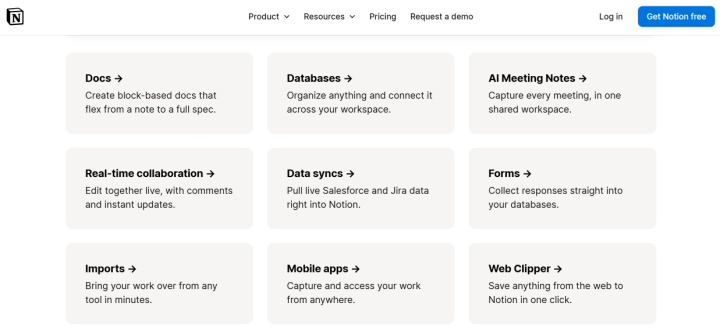
- Real-time collaborative editing. The platform allows multiple participants to work on the same page simultaneously, editing its content and design. Changes and comments are reflected almost instantly for other users. Collaboration capabilities extend not only to documents but also to tasks, databases, and other ecosystem components.
- Mentions and comments. Mentions (@) help you communicate with team members, quickly notifying them of important information. You can use the corresponding database properties to assign responsibility for tasks. Inline comments allow you to discuss the content of pages and individual blocks, leave comments, and share feedback in context.
- Shared workspaces. For team collaboration, Notion offers Teamspaces. These are themed spaces within the company's shared workspace. They allow you to host pages, databases, and documents, invite participants, and customize access levels. For example, a company could create separate Teamspaces for marketing, IT, HR, and other departments. Depending on the team's needs, spaces can be open, closed, or private. Private Teamspaces are available on the Business and Enterprise plans.
- Access rights management. The platform supports a multi-level access management system. Depending on the workspace type and pricing plan, users can be assigned the roles of members, restricted members, guests, temporary members, and workspace owners. The Enterprise plan also offers dedicated administrative roles. Permissions can be configured at the page and Teamspace level, including viewing, commenting, editing, and full access.
Collaboration capabilities are just one aspect of Notion's scalability. As teams grow and the volume of information increases, data organization, standardized workflows, and centralized access management become crucial. Let's look at solutions that help the platform address these challenges:
- Scalable architecture. The platform supports a hierarchical page structure (pages, subpages, and databases) and organizes content into topic-based workspaces.
- The database is the core of the system. The database supports multiple processes. Its data is easily adapted to different use cases through filters and properties, and is visualized using various presentation methods (boards, tables, calendars, etc.).
- Templates for standardization. Notion allows you to standardize processes and tasks using a built-in template catalog. It includes project briefs, product specifications, hiring funnels, meeting minutes, and more.
- Enterprise-grade security and access management options. Notion offers advanced access control tools, including page- and workspace-level permissions, private Teamspaces, guest access for external participants, and SAML SSO. SAML SSO is available on the Enterprise plan. Larger organizations also benefit from centralized user management and additional administrative tools.
Advantages of Notion
Notion combines tools for working with information, managing tasks, and organizing team processes in a single workspace. Adaptive settings and a wide range of features make this platform suitable for both personal tasks and for organizing collaboration between small teams and large companies. Its key advantages include the following:
- Flexible workspace customization. Users can create pages, databases, and templates and customize them to suit their needs. This allows them to build virtually any type of workspace in Notion, from a personal planner to a corporate knowledge base or project management system.
- Centralized information storage. Documents, notes, tasks, project documentation, knowledge bases, and other materials can be collected in a single workspace. Instead of being scattered across multiple services, these materials are stored in one place, making them easier to find and manage.
- Collaboration. Notion allows multiple users to work on documents and databases simultaneously. They can leave comments, mention colleagues, and share pages. A customizable permissions system helps manage access to information across the entire workspace, individual pages, and other objects.
- Workflow automation. Internal automation tools allow you to configure specific actions based on specified conditions or data changes. For example, you can automatically update task statuses, send notifications, and trigger related actions. Integrations with third-party services and APIs provide additional automation capabilities.
- Artificial intelligence tools. Notion AI helps you create and edit texts, shorten lengthy materials, extract key information, and answer questions based on the content in your workspace. This simplifies working with large volumes of information and reduces the time spent on routine tasks.
- Scalability. The Notion workspace can be gradually expanded as the needs of a user or organization change. Users can add new databases, pages, templates, participants, and workflows without creating a separate system for each new area of activity.
Conclusion
Notion is one of the most widely used workspace and productivity platforms, with millions of people relying on it to organize information, manage projects, and collaborate. Since its founding in 2013, the platform has undergone several iterations and relaunches, evolving from an experimental project into a multifunctional workspace for organizing information, managing workflows, and supporting team collaboration.
Today, Notion is more than just a set of tools for managing documents and tasks; it's a flexible environment where you can build everyday workflows, integrate information from various sources, and organize collaboration between team members. Users can start with simple workflows and gradually expand their use of the platform as their needs evolve.