
Top 7 Integrations: How to Automate Marketing Workflow

It’s rare to find a marketer who relies on just one tool. A modern marketing tech stack often spans ad platforms, website form builders, social channels, and messaging apps. When data is transferred manually, it wastes valuable time. Smart workflow automation solves this by connecting your apps and keeping team data synchronized without extra effort.
With ApiX-Drive, you can easily connect services to automate marketing tasks and ensure seamless data flow. Below are seven practical integrations for marketers that cover lead collection, contacts, analytics, and team management.
Facebook Lead Ads → Google Sheets
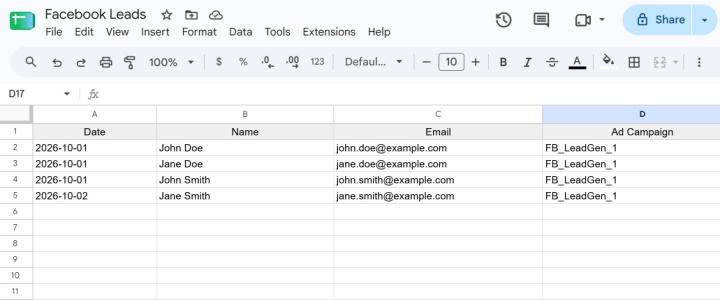
The ad is already running and new leads are regularly coming in through Facebook Lead Ads. There's no point in manually entering them into the spreadsheet every time, as the integration does it automatically. Each new lead is transferred to Google Sheets and added as a separate row. Depending on the form fields, the spreadsheet may include the name, phone number, email, and other information the potential client left.
This setup functions as lightweight lead automation software, giving teams a central hub to track incoming prospects without exporting CSV files from Ads Manager. In Google Sheets, leads can be easily sorted, assigned to managers, or used for follow-ups.
Google Lead Form → Trello
After receiving a request through the ads form, something needs to be done: contact the potential client, clarify details, or transfer the order to another employee. In this case, it's more convenient to automatically convert submissions into work tasks.
You can implement marketing workflow automation here by connecting Google Lead Forms to Trello. Each new form response automatically creates a card on your designated board, bringing essential prospect details directly to your workspace. The team sees the new card and takes it to work: assigns a responsible person, tracks the status, and controls further steps on the lead.
Webflow → Mailchimp
The user leaves contact details through a form on the website, after which they need to be added to the database for email communication. If there are few such requests, manual import may seem like a small thing. But when contacts arrive constantly, this operation takes up the specialist's time and attention, turning into an annoying routine.
Connecting Webflow with Mailchimp cuts out those extra steps. Prospects fill out a form, and their details go to the right Mailchimp audience list. The marketer does not need to transfer data manually, and the new lead is faster in the system, where it can be worked on further. Such automation allows the specialist to focus on preparing communications and not be distracted by the routine transfer of contacts.
Google Analytics 4 → Slack
Analytics are only valuable when the team regularly reviews the data and uses it in their work. In practice, checking metrics is often postponed due to a chain of routine actions: you have to go to Google Analytics, find a report, evaluate the dynamics of conversions and, if necessary, share the results with colleagues.

- Automate the work of an online store or landing
- Empower through integration
- Don't spend money on programmers and integrators
- Save time by automating routine tasks
Connecting GA4 to Slack brings your essential metrics straight into your team’s workspace. Data from the conversion report is delivered to the specified channel of the messenger on a set schedule (for example, daily). Team members do not need to search for indicators in the analytical system every time. The report appears right where they discuss current tasks and results.
TikTok Lead Ads → HubSpot
TikTok Instant Forms capture leads directly inside ad campaigns. Implementing direct marketing integrations between TikTok Lead Ads and HubSpot sends new leads straight into your CRM without delays.
When you integrate TikTok Lead Ads with HubSpot, this process happens automatically. A new lead becomes a contact in your CRM shortly after the request is received. It can then be used in your usual lead management processes: from segmentation to sales and communication.
Google Calendar → Asana
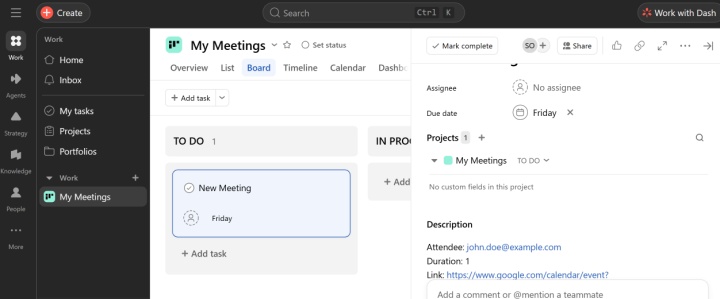
Booking a meeting in Google Calendar is just the beginning of the workflow. After that, you may need to prepare presentation materials, gather client information, follow-up, etc. To keep track of these actions, you should record them as tasks in Asana.
The Google Calendar and Asana integration automatically creates a task when a new event appears on the calendar. The necessary event data is transferred to the task manager, so the team does not have to manually transfer information from the calendar. The responsible specialist can take the task into work without unnecessary delay.
Instagram → Airtable
Instagram messages can contain questions about a product or service, reactions to content, or other requests that you don’t want to lose in the general flow. If your team works with a lot of such messages, it’s very useful to collect and store them in a structured way.
Connecting Instagram to Airtable automatically saves incoming messages into a structured database. There, you can organize them, add your own fields and comments, group them, and analyze them. Thanks to this useful setup, incoming requests no longer get buried in social media inboxes, keeping your data structured and easy to access.
Conclusion
Routine tasks and information transfers between different services take up a lot of marketers' time. Collecting leads, transferring contacts, sending reports, or creating tasks may seem like small things on their own. However, when combined, these processes significantly overload the team, eat up work hours, and cause delays.
Effective marketing automation removes weak links from your operations, creating an integrated system that runs reliably around the clock. As a result, your team spends less time handling manual tasks and more time driving actual marketing growth.
You can set up any of these automations in minutes without any developer involvement. For detailed guides and tips, see our help.
Other automation implementation cases: