How to Automate Gmail Attachment Processing

The speed of information processing and transmission is one of the key factors that directly affects a company's competitiveness. Managers, of course, understand this, but they still spend up to 30% of their working time on repetitive tasks: downloading files from email, renaming documents, creating folders in cloud storage, and copying data into reporting tables.
When the number of incoming emails increases, problems begin: files get lost, messages get missed, and project deadlines get pushed back. In this case study, we'll explain why and for whom Gmail attachment processing automation is important. We will show you how to build a file processing system that works completely autonomously and transforms a chaotic flow of emails into an organized database.
Problem: Overload With Incoming Files
Let's consider a typical situation using the example of a digital agency or creative studio. The team begins working on a new project. This could be promoting a new brand online or launching a new business.
A project manager receives dozens of briefs, logo variants, and technical specifications in Gmail every day. The specialist needs to download, process, and organize all files, share them with the design team or the right team members in a work chat, and log the details in a spreadsheet.

Without automated attachment transfer, the manager has to additionally perform the role of a “postman”:
- Go to Gmail and open a new email.
- Download the attachment to the computer.
- Log in to the Box cloud storage service and upload the file there.
- Go to Telegram to send the document with the project brief to the work chat of the relevant department.
- Open Google Sheets and enter the date, file name, and sender's name into the spreadsheet.
The time spent on this chain of mechanical actions is from 5 to 10 minutes per email. With an intense flow of emails, a manager is forced to spend about a third of the working day managing files — transferring them from one service to another. As a result, there is an unacceptable shift in focus from strategic tasks and communication to primitive actions.
Continuing to do this in the 2020s is like trying to make fire with a flint or using an abacus instead of a calculator. A drop in productivity, KPIs, and other vital business indicators will not be long in coming if nothing is changed in the organization of processes. To avoid this, routines must be automated.
Technological Solution: Automated Attachment Routing
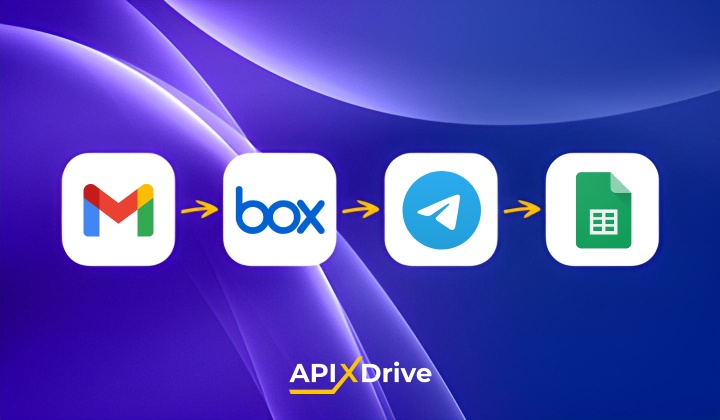
Automation is implemented based on the ApiX-Drive platform, which allows you to configure automatic data transfer between services without writing code. The logic of the integration is based on the sequential execution of actions across four systems: Gmail, Box, Telegram, and Google Sheets.
After the client sends a file with a project brief, it quickly appears in Box. In about a minute, the team members can see the file in Telegram. And in Google Sheets, a new row labeled "New project brief" automatically appears with the date, the sender’s name, and other relevant information.
Step 1. Download Attachments From Gmail
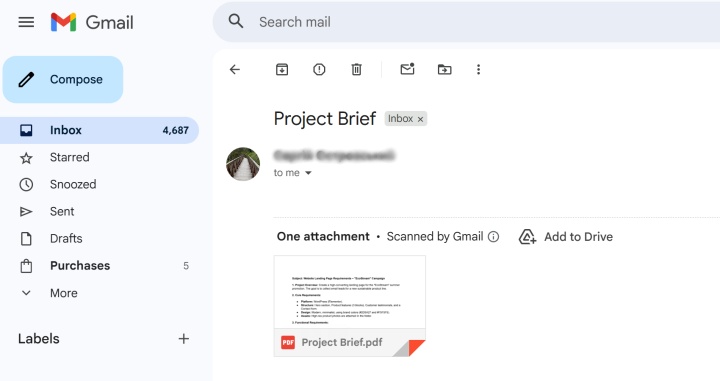
ApiX-Drive automatically checks your inbox at a specified time interval. As soon as a new email with an attachment appears, a trigger is activated. The connector downloads the file from the email for further processing.
Step 2. Reliable Storage in Box
After the connector receives the attachment from the email, it transfers it to the Box cloud storage service. This allows for efficient file storage and management. The result is a structured archive that the entire team can access from any device.
At this stage, you can use Dropbox cloud storage. Integration with Google Drive will also be available in the near future.
Step 3. Notification in Telegram
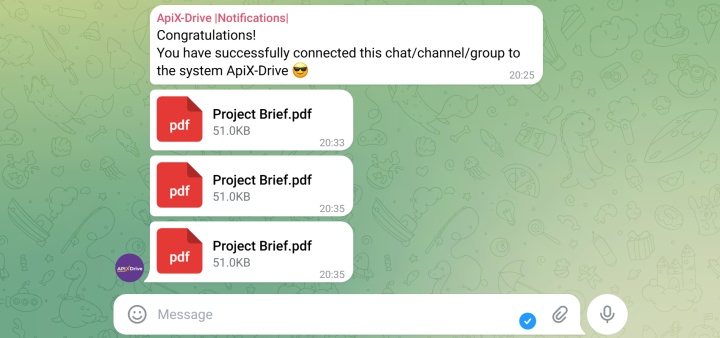
The automated system sends the document directly to the Telegram bot or group chat of the team members. In this way, they quickly learn about the availability of a new project brief and immediately receive it directly. They must see not just a text message like “You have received a new project brief” but a file (document). Integration of Gmail and Telegram for business is very convenient, as it eliminates the need for specialists to constantly check their email.
Step 4. Automatic Document Registry in Google Sheets
The final stage is automatic logging in a Google spreadsheet. Metadata is entered into it: the date the attachment was received, the sender's email and name, the file name, etc. Thus, without human intervention, the system creates a solid foundation for further analysis and timely control of work performance.
Implementation Results in Numbers
Automation of attachment processing creates not only convenience but also direct economic benefits. Below are estimates based on average metrics from companies that have implemented this operational model.
| Indicator | Before automation | After automation | Effect |
|---|---|---|---|
| Time to process one email | 8-10 minutes | 0 minutes (background mode) | Saves 100% of time |
| Risk of document loss | 15% (human factor) | <1% | Data retention |
| Response speed to request | From 30 min to 4 hours | Automatic notification in chat | 10-20 times faster |
| Routine workload (per month) | ~40 hours/employee | 0 hours | 1 week freed up |
Key Benefits for Business
- Payroll optimization. Instead of hiring an additional manager to work with documents, the company uses an integration that works independently 24/7.
- Transparency of processes. The company manager can open Google Sheets at any time and see all incoming documents without distracting the team with unnecessary questions.
- Increasing customer loyalty. The faster the file reaches the contractor, the sooner work on the project begins. This level of efficiency reflects a high standard of service that clients notice.
- Scalability. The automated system processes 5 or 500 files per day equally effectively. Business growth is no longer accompanied by a proportional increase in administrative workload and does not require urgent staff expansion.
Conclusion
Building the Gmail -> Box -> Telegram -> Google Sheets integration is a reliable investment in stable business processes. Thanks to ApiX-Drive, document workflow automation setup takes no more than 15–20 minutes and does not require the help of programmers. This allows the team to focus on what really brings profit by delegating routine file processing to automated workflows. Eliminating the need for manual copying, uploading, and transferring files to several services provides significant time savings, increases the overall comfort of work, and increases the business's resilience to high loads.
Useful materials: