
Automating Form Data Processing in WordPress

While WordPress is extremely flexible and extendable, almost no business website can manage operations without automation. This can range from a simple form integration with a CRM or database to more complex scenarios.
Traditionally, WordPress plugin developers added a dedicated integration for each tool. For example, if a site used a specific CRM, it required a matching add-on or a built-in integration. But this approach is very limited, as with the number of tools existing today, appearing and disappearing on the market, it would be quite a challenge to keep up.
Another reason why the approach has changed is the number of integrations — now, it’s most often not one or two tools, but a whole chain with its own firing logic. Consequently, the most effective solution is to use a powerful integration service for WordPress websites. It’s the best way to handle customers and seamlessly distribute information across multiple platforms, e.g., CRMs, spreadsheets, calendars, email, and so on. This tool must be robust enough to cover even the most complex scenarios, and easy to set up.
The Hidden Power of WordPress Forms
There is a common misconception that WordPress forms are only for simple tasks like collecting a name and email. But in reality, modern form builders go far beyond that and can act as a foundation for much more complex functionality.
Any interface where users can input data on a website is essentially a form. With the right setup, forms can become the core of user interaction on a site. You can build user dashboards, collect and manage structured data, trigger workflows, and even simulate parts of full applications, all without writing everything from scratch. In many cases, forms are not just inputs; they are interfaces.


Talking about plugins that offer direct integrations with third-party services, CRMs, payment systems, and marketing tools, they can speed things up significantly, especially if your use case fits their predefined logic. But this convenience comes at a cost; these integrations are often expensive and still limited to a fixed set of services.
And that’s where the limitation appears. No plugin can realistically support every possible integration or business logic you might need. At some point, you either adapt your workflow to the tool or you look for more flexible approaches that let you control how data is processed and where it goes.
The best approach when choosing a WordPress form plugin is to look for one that offers a wide range of tools, so users can build solutions of any complexity, along with a universal way to handle integrations.
At the moment, webhook support is one of the most flexible options. When a form can send data to external webhooks, you are not limited to predefined integrations from the plugin or the third-party service. Instead, you can trigger automation with almost any system that can receive HTTP requests. For example, the JetFormBuilder plugin offers all of these perks, having a free core version as well, which is a big advantage. It also has seamless integrations with powerful plugins like JetEngine and tools for booking and filtering, so you get an ecosystem. Combined with well-made integration scenarios, you can get really impressive results, without coding or spending too much time on configuration.
Let’s see how it can be done using some popular scenarios.
Connecting JetFormBuilder to Your Business Tools with ApiX-Drive
Let’s see how we can connect a form with Google Sheets and HubSpot CRM. There’s a form where students can submit their applications, and they should be collected in a Google Sheet for quick monitoring by the marketing team. On HubSpot, a new ticket should be created for the educational team to check it.
ApiX-Drive has a dedicated JetFormBuilder source when you create a new connection, so you can use either. Then, click “Connect.”
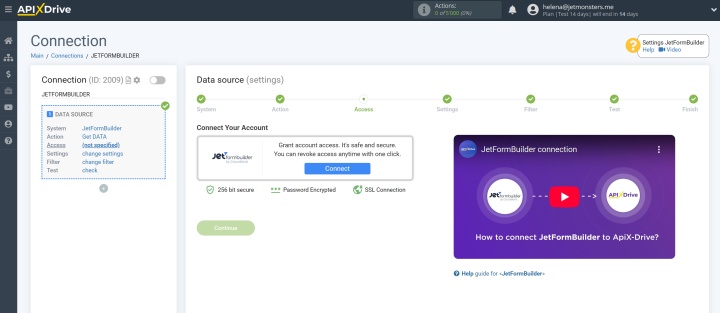
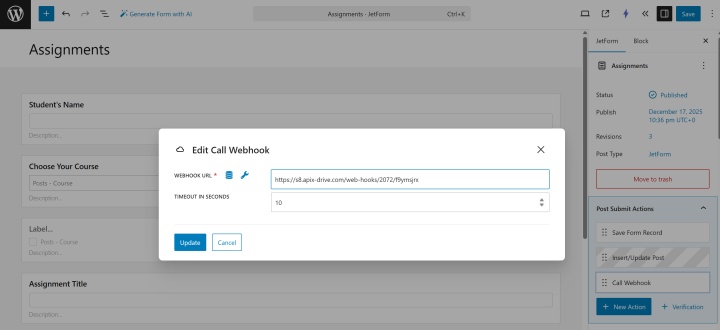
Follow the intuitive steps, and copy the webhook URL generated by ApiX-Drive. Now, switch to your WordPress site and open the form you want to create automation for.
In the JetForm tab > Post-Submit Actions, click the “+ Add new action” button and select a Webhook from the list. Insert the webhook URL in the field, save it, and save the form.
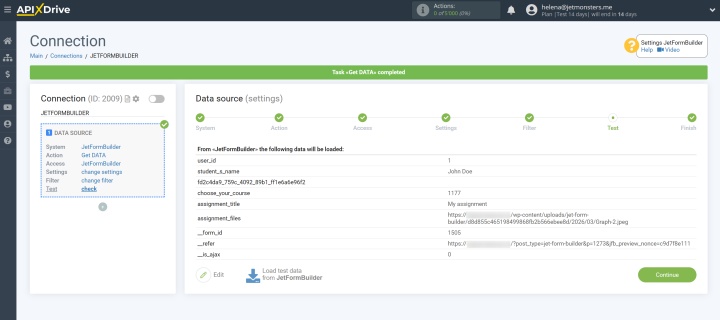
Now, fill out the test form so ApiX-Drive can receive the data needed to map the existing fields. Go back to the ApiX-Drive dashboard and click “Load test data.” At this point, you will see some data from the fields you’ve just filled out.
In the next step, connect the Google Sheet and choose an action — “Add a new row” in my case. I can send sample data to a Google Sheet and see it appearing there.
Now, it’s time to connect to HubSpot. Click the “+” icon on the left panel, add the “Data Destination” category, choose HubSpot, and “Create a Ticket” action. Log in, and after setting up the action and mapping all the fields, click “Send test data.”
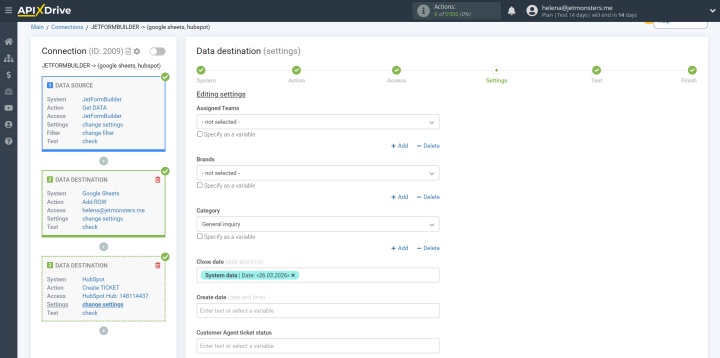
If everything works smoothly, enable auto-updates and enjoy smooth automation. Every time the form is submitted, you will see a new row in the Google Sheet and a new ticket in HubSpot.
Automation and WordPress Performance: Popular Myths and Concerns Addressed
There are many myths about how automation can affect website performance. Let’s address them one by one.
Myth 1: “Automation slows down WordPress.”
The truth: properly implemented automation does not run on every page load, so it does not affect frontend performance.
- Tools like JetFormBuilder execute actions only on form submission, not continuously.
- Webhooks send data externally, so processing happens outside your server; that’s why they don’t load it.
So: automation is event-based, not a persistent load.
Myth 2: “More integrations = slower site.”
The truth: modern integrations (especially webhooks) are lightweight.
- Webhooks send a single HTTP request, with usually milliseconds of overhead.
- External platforms like ApiX-Drive process data off-site, reducing server strain.
- Compared to traditional plugins that run logic internally, webhooks are often more efficient.
So: integrations shift workload away from WordPress, not onto it.
Myth 3: “Automation increases server load.”
The truth: only poorly designed setups do.
- WordPress runs on a request-response model, and nothing happens unless triggered.
- Automation is triggered by form submission and scheduled tasks (cron).
So: a well-configured system produces a negligible load increase.
Myth 4: “Cron jobs and background tasks are dangerous.”
The truth: the issue is not cron itself, but misuse.
- WordPress uses WP-Cron, which runs on page visits.
- High-frequency or poorly written jobs can cause issues, but disabling WP-Cron and using a server-level cron solves it; most automation tools run tasks externally, not via WP-Cron.
The myth is busted: cron is safe when used correctly.
Myth 5: “Automation breaks performance at scale.”
The truth: scaling issues come from architecture, not automation.
- At scale, bottlenecks are database queries, hosting limitations and caching misconfiguration.
- Automation platforms are built to handle high volumes externally.
So: WordPress remains a trigger point, not the processing engine.
FAQ
Do I need coding to automate WordPress forms?
No. Powerful and modern tools like JetFormBuilder and ApiX-Drive support automation via built-in actions and webhooks, so you can connect forms to external services without writing code.
Can I send data to multiple tools at once?
Yes. Using webhooks or integration platforms like ApiX-Drive, a single form submission can trigger multiple actions simultaneously, for example, sending data to a CRM, email service, and Google Sheets.
You can also format data, perform calculations, apply conditional logic, and transform values (e.g., map fields, search and replace data, or convert formats) before sending it to each destination.
What about GDPR/consent storage?
You can store user consent directly in form submissions by adding required consent fields. JetFormBuilder allows you to save this data alongside entries, so you have a record of user agreement for compliance purposes.
Takeaway
Professional and powerful WordPress form builder plugins like JetFormBuilder and flexible and powerful automation services like ApiX-Drive can level up your business processes and make them really work for you. WordPress is an extremely flexible CMS, which allows you to build dashboards and complex systems.
Try creating your own integration, and see how easy it is to implement and how efficient it can be for your business.
Read also on our blog:
- Common Survey Formats You Can Create Using Web Forms
- How to Integrate JetFormBuilder and Notion: Step-by-Step Instruction
- Firecrawl Explained: Turning the Web into Usable Data with AI
- Apollo.io Explained: How This Platform Supercharges Sales and Lead Generation
- TikTok and Google Calendar Integration: Automatic Lead Transfer