
Formbricks Review: What the Platform Offers, Key Features, and Pricing

In this article, we'll discuss one of the most promising data collection and processing services, which stands out from the competition thanks to its openness, flexible customization, and privacy-first approach. We are talking about the Formbricks service. You will learn about the key tools and capabilities of this platform, application scenarios, and pricing.
What Is Formbricks
Formbricks is an open-source experience management (XM) platform. It helps collect feedback from customers, employees, and other stakeholders across various touchpoints with the target audience. The service offers a comprehensive set of survey development tools with flexible targeting options. Users can quickly and easily find the solution they need, from simple web forms to comprehensive XM services with advanced capabilities.
Formbricks allows you to create various survey types and formats using the built-in editor or use ready-made templates from an extensive library. You can also distribute them in several ways: through websites, mobile/web apps, and email newsletters, as well as embed surveys into various products.
The platform provides businesses and other categories of users with a centralized feedback management solution that allows them to effectively manage and monitor all relevant polls, respondents' responses, and associated workflows. By the way, with our ApiX-Drive platform, you can create integrations for Formbricks yourself without any special skills. This will automate data transfer to other services and tools, improving the efficiency and speed of response processing.
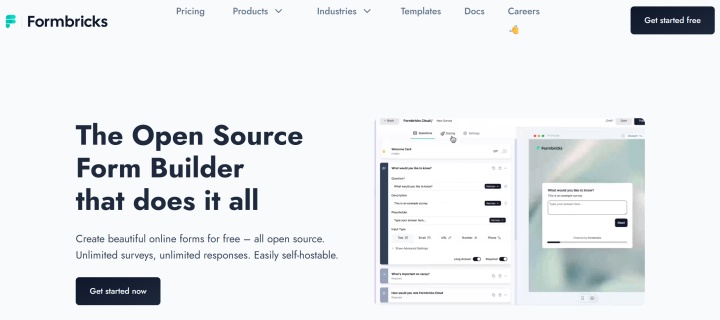
The Formbricks survey platform is a popular open-source alternative to XM services like SurveyMonkey, Typeform, Jotform, and Qualtrics. Its open source code allows for flexible customization and configuration of its functionality to suit the needs and activities of a specific team or company.
Source: formbricks.com
Founded in 2022, the experience management platform is used by more than 10,000 teams and companies, and the in-app surveys it creates and processes are used in over 100,000 apps. Formbricks provides customizable EX products for a range of scenarios and industries. These include e-commerce, finance, healthcare, retail, market research, government and non-profit organizations, and more.
Core Features and Capabilities
Let's take a closer look at the main Formbricks features.
Survey and Form Builder
The built-in drag-and-drop editor makes it easy and convenient to create surveys and other forms in no-code mode. You can create surveys from scratch or use templates and then customize the questions, answers, and flow of steps.
Multilingual surveys, advanced conditional logic, variables and calculations, email verification, survey auto-completion based on time or response limit, hidden fields, PIN protection, image or video embedding, email notifications, survey completion redirects, custom domain connectivity, and other options are also available.
Templates
Formbricks offers hundreds of professional templates for different industries (SaaS, ecommerce, etc.), specializations (marketing, product management, sales, customer service, etc.), and touchpoints (website, app, link).
All templates are organized in the catalog by key parameters. Priority scenarios, advantages, and application procedures are listed for each. Examples of visualizations for a specific survey on desktop and mobile devices are also provided, along with similar templates highlighted.
API and Webhooks
Formbricks provides programmatic access through two APIs: the Public Client API for frontend interactions without authentication, and the Management API for full account access through personal API key authentication. The Management API supports creating and managing surveys, handling responses, working with action and attribute classes, managing contacts, and controlling webhooks.
Webhooks enable real-time HTTP notifications for three trigger types: responseCreated, responseUpdated, and responseFinished. Setup is straightforward through the app's UI or programmatically via the Webhook API.
Setup and Targeting
The platform allows for flexible survey management: adding different question types, setting up validation and restrictions for respondents, using hidden fields, or distributing them via single-use links.
The surveys and forms you create can be easily embedded into websites, apps, and other software. The compact SDK doesn't slow down the software, and automation tools enable surveys to be automatically launched or completed based on a wide range of triggers. Native targeting options allow you to conduct surveys and research among the most relevant audiences, significantly improving the quality of the data you collect.
Customization and Branding
Surveys created using the editor or templates are easily customizable. Each survey can be customized with various design parameters, from layout dimensions and field spacing to colors and background images.
Furthermore, comprehensive template branding is available by uploading a logo and other branding elements. The platform also allows for custom links and redirects, as well as customization of backend functionality thanks to open source code.
How Formbricks Works in Real Use Cases
Next we will discuss the popular Formbricks use cases — namely, how and for what tasks this platform is used by modern companies.
Feedback Session
Businesses often collect feedback from customers through surveys, using the results to correct shortcomings in their products/services and improve the quality of service.
Survey distribution is supported through a number of audience touchpoints: email newsletters, websites, custom links, or mobile/web apps. In-app surveys are particularly popular, often used during beta testing, new feature rollouts, or other stages of product development.
NPS (Net Promoter Score) Tracking
Formbricks polls have proven highly effective in measuring the NPS metric, which helps track customer satisfaction and loyalty. They help businesses regularly track NPS through surveys published on websites, in email newsletters, or in apps.
A built-in calculator with functions for collecting feedback, sorting respondents by category (Promoters, Passives, Detractors), calculating Net Promoter Score, and analyzing results helps optimize processes and improve product/service quality.
Onboarding and Customer Journey Automation
Surveys conducted through the platform are often used to address pressing marketing challenges. They allow businesses to easily and effectively collect important data at key stages of the customer journey, then use it to automate interaction processes.
Priority scenarios for this area include surveys on the quality of onboarding or customer support, check-ins at key stages of the customer journey, identifying early signs of audience churn, etc.
Customer Experience Assessment
Formbricks feedback tools are also often used to collect and process relevant data to help assess the quality of the experience customers receive when interacting with a brand and its products.
To automate such tasks, several specialized online calculators are available to help calculate key marketing metrics: Customer Satisfaction (CSAT), Customer Effort Score (CES), CX ROI, customer churn, etc.
Internal Staff Surveys
Another popular use case for the platform among businesses is conducting employee surveys and questionnaires. This includes employee satisfaction surveys (eNPS), team feedback loops, event feedback, quarterly surveys, new employee onboarding quality surveys, and more.
Pricing and Plans
It is worth mentioning Formbricks pricing. The platform offers two separate pricing plans: one for hosting data in its cloud storage and one for self-hosting.
Cloud
- Free (unlimited surveys, 1,000 responses/month, 2,000 contacts, 3 projects, unlimited participants, survey placement via links, in-product and email surveys, iOS & Android SDK for mobile surveys, conditional logic, hidden fields and other options, API & Webhooks, all integrations).
- Startup ($49/month, all Free features + 5,000 responses/month, 7,500 contacts, no platform branding, attribute-based targeting).
- Scale & Enterprise (price upon request, all Startup plan features plus individual response/contact/project limits, email follow-ups, team access roles, multilingual surveys, 99% uptime SLA, premium support).
Self-hosting
- Community Edition (free, unlimited participants and surveys, poll placement via links, on websites, in apps, and in email newsletters, all question types, email follow-ups, advanced logic, custom URLs, file uploads, hidden fields, single-use links, etc.)
- Enterprise Edition (price upon request, all features of the Community plan + no platform branding, team management and role-based access, contact management and segmentation, unlimited projects, white-label email follow-ups, multilingual surveys, 2FA, SAML SSO, OIDC SSO, spam protection with ReCaptcha v3, etc.)
Bottom Line
Experience management (XM) platform Formbricks was able to confidently enter the rankings of best survey tools. A number of its functional advantages played a key role in its success: open source code, flexible customization, self-hosting options. Thanks to these and other factors, Formbricks is actively expanding its client base.
Routine tasks take a lot of time from employees? Do they burn out, do not have enough working day for the main duties and important things? Do you understand that the only way out of this situation in modern realities is automation? Try Apix-Drive for free and make sure that the online connector in 5 minutes of setting up integration will remove a significant part of the routine from your life and free up time for you and your employees.