Automated Customer Request Processing Without Manager Involvement

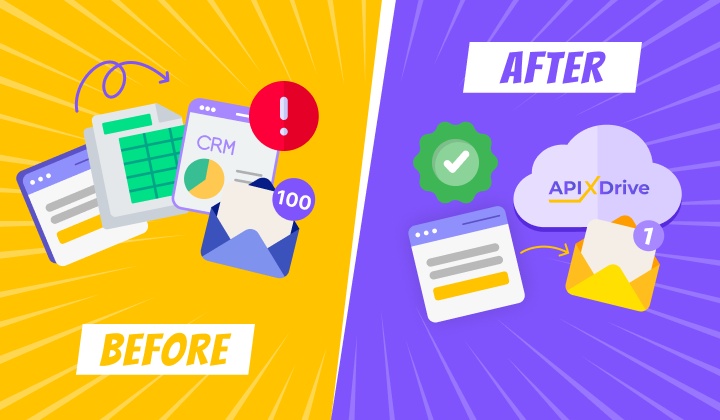
Every day, businesses lose customers due to slow communication. The user fills out a web form and waits for hours for a manager to respond. During peak periods, requests are completely lost in the flow. ApiX-Drive automates the entire process: the system itself sends a personalized response in a few minutes, without involving managers.
Problem
The company receives dozens of submissions via a web form — from consultation requests to service complaints. Each such case requires a quick response. But a typical processing scenario looks like this: a manager receives a new request, manually copies the data into CRM, formulates a response depending on the type of request, and sends a letter. This takes from 10 to 30 minutes for each form submission. When the flow increases, some customers receive a response after a few hours or are left without feedback at all.
The problem is not in the correspondence itself but in the routine transitions between systems: form → email service → CRM (or spreadsheet). It is also necessary to consider the need to analyze data from completed forms. Plus the human factor: during peak hours it is easy to miss an important request or send a template response to the wrong client.
Solutions Using the ApiX-Drive Platform
Implementing automation has long been a necessary component of efficient workflows. In our case, we need to optimize several tasks at once:
- Processing of requests (including analysis of the nature of the message).
- Sending a letter to the client in response.
- Adding information to a service that provides convenient data storage.
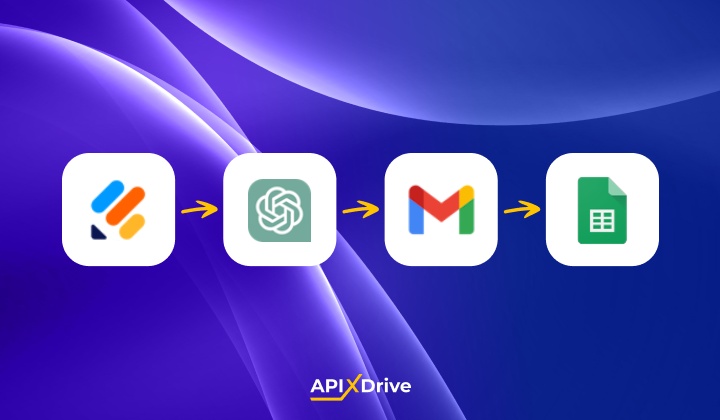
For our automated process, we will use the following set of services: Jotform (receiving data via a web form), ChatGPT (analysis of the nature of the request and formation of a response letter), Gmail (sending a letter), and Google Sheets (data storage). The scheme works like this:
- The clients fill out the form — leaves their question, feedback, or request for a consultation.
- The data automatically enters the AI TOOLS module (here you need to write a prompt for ChatGPT). Artificial intelligence analyzes the content of the request, determines the tone (neutral, dissatisfied, urgent, etc.), and generates a personalized response.
- An email is sent via Gmail — a ready-made letter with adapted text and relevant information is sent to the client automatically.
- All the necessary query data is added to the Google Sheets. We also recommend adding the answers generated by AI to the table so that you can monitor its work (what answer the client received).
This approach maintains the speed of automation and provides the appropriate level of personalization thanks to AI. Clients do not receive a mechanical template like “Thank you for your inquiry, we will get back to you” but sees a specific answer that takes into account the context of their question.
Example of Automation Work
A client leaves a review: “I ordered a consultation a week ago, no one has responded yet. Is this normal?”

- Automate the work of an online store or landing
- Empower through integration
- Don't spend money on programmers and integrators
- Save time by automating routine tasks
AI analyzes the tone (dissatisfaction + urgency) and generates a response:
Instead of the standard “Thank you for contacting us,” the customer receives a specific response that acknowledges the problem and offers a solution.
Keep in mind that to effectively work with AI, you need to first test different prompt options so that the result meets your tasks and expectations. We recommend giving the AI bot clear instructions to minimize the likelihood of formulating incorrect emails. Regularly check the generated answers and, if necessary, refine the prompt.
Also, check the current prices for API requests for your chosen AI model. To achieve this, use the providers' official websites.
Result
The processing time of one request is reduced to several minutes. No client is left without a response. Managers stop wasting time copying information between systems and can focus on complex cases that require human intervention.
Reference materials that will help automate workflows:
- Setup process for Jotform
- Example of working with the AI TOOLS block
- How to set up sending emails via Gmail
Video Tutorial (Automatically Adding Rows in Google Sheets)
Time is the most valuable resource in today's business realities. By eliminating the routine from work processes, you will get more opportunities to implement the most daring plans and ideas. Choose – you can continue to waste time, money and nerves on inefficient solutions, or you can use ApiX-Drive, automating work processes and achieving results with minimal investment of money, effort and human resources.